

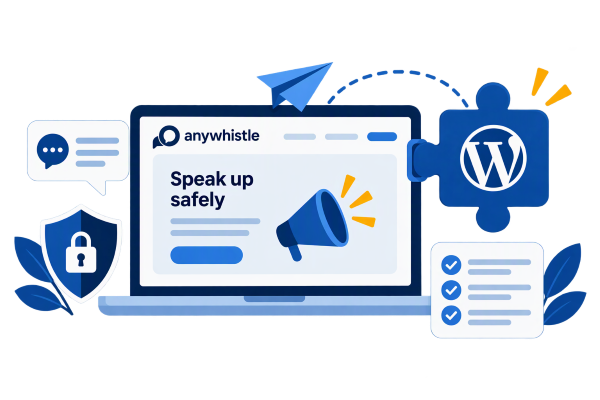
Anywhistle – A Secure Reporting Channel for Your WordPress Site
Anywhistle is a WordPress plugin that enables companies to implement a reporting channel in compliance with the EU Whistleblower Directive and the Whistleblower Protection Act. Whistleblowers can submit reports anonymously; reports are stored in encrypted form, and they are handled only by individuals designated by the company. The channel operates on the company’s own website, so the data remains under the company’s control.
Anywhistle is currently in production use on Altivo Oy's own notification channel service here at anywhistle.com.
What Anywhistle Does
Anywhistle handles the entire lifecycle of a report: receipt, processing, communication with the reporter, and data deletion after the retention period has expired.
To the Reporter
To the person handling this
To the Administrator
Here's how it works
The channel will be up and running in a few minutes, and each company will have its own address, such as sivusto.fi/yritys.
- Install and activate. Install the plugin in WordPress and enter the license key in the settings.
- Add a business. Enter the name, address, and languages. In the Pro and Business versions, you can also add a logo and colors. The channel's homepage and form are generated automatically.
- Appoint the administrators. The administrator will receive an invitation via email and will enable two-factor authentication upon their first login.
- Share the link. Add the channel's URL to the intranet, orientation materials, or the company's website.
- A notification arrives. Processors receive an email alerting them to a new notification—without the notification's content—and log in to the processing area to read it.
- Processing and Feedback. The processor acknowledges the report, requests additional information if necessary, and provides feedback. The reporter can view the messages using their username and password.
- Deletion. A completed report and its attachments are automatically deleted after the retention period set by the company.

Data Security and Anonymity
Whistleblower protection is built into the add-on and is not dependent on regulations.
- Encryption: Notifications, messages, and attachments are stored in the database in encrypted form. Each company has its own encryption key.
- No traces: IP addresses or browser information are not stored. The ad pages do not contain any tracking or analytics cookies, and only a necessary session cookie is used to track ads.
- Separate from the website: The listing pages do not load code from the theme or other plugins, and they do not appear in search engines.
- Companies are isolated: Companies within the same installation cannot see each other's data.
- Access Rights: Only designated users can view notifications. Logging in requires two-factor authentication, and all actions are recorded in the event log.
- Data Under Your Control: Notifications remain on your company’s own server. Altivo Oy does not receive any notifications. The license check sends Altivo only the license key, the website address, and the add-on version.
Versions
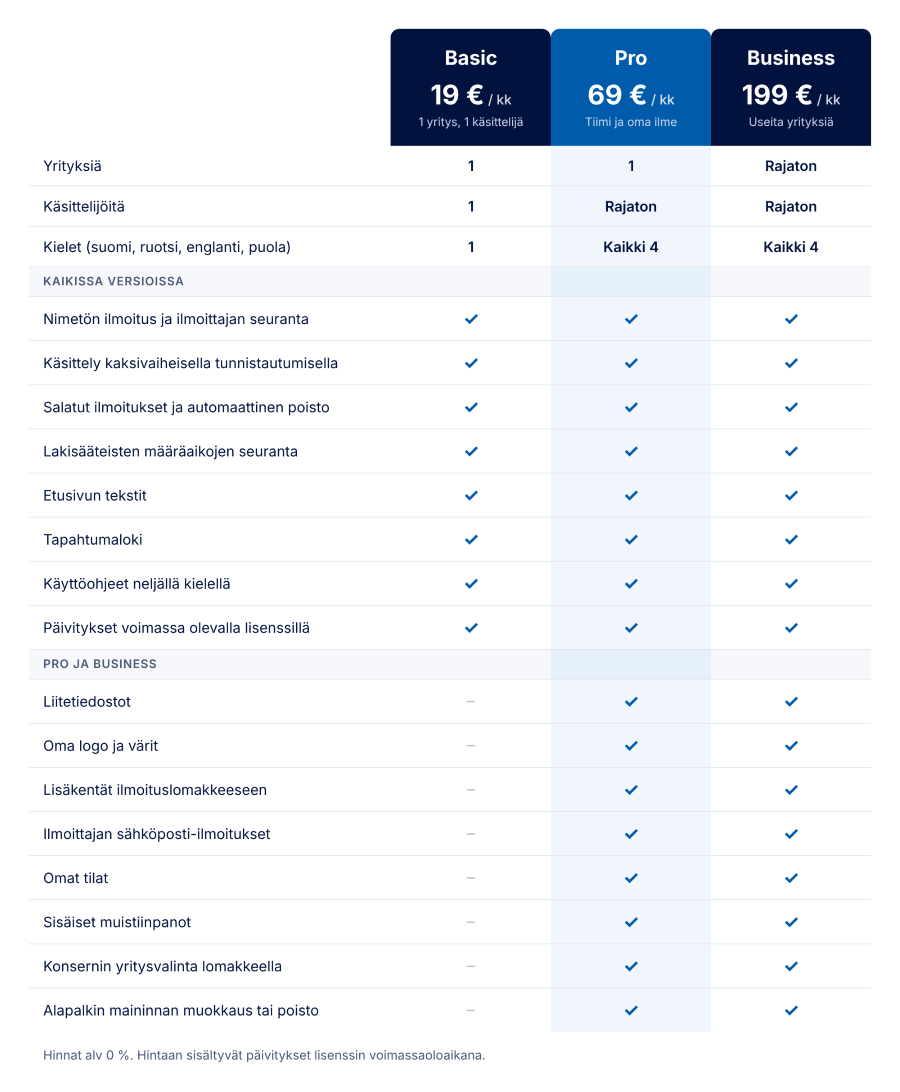
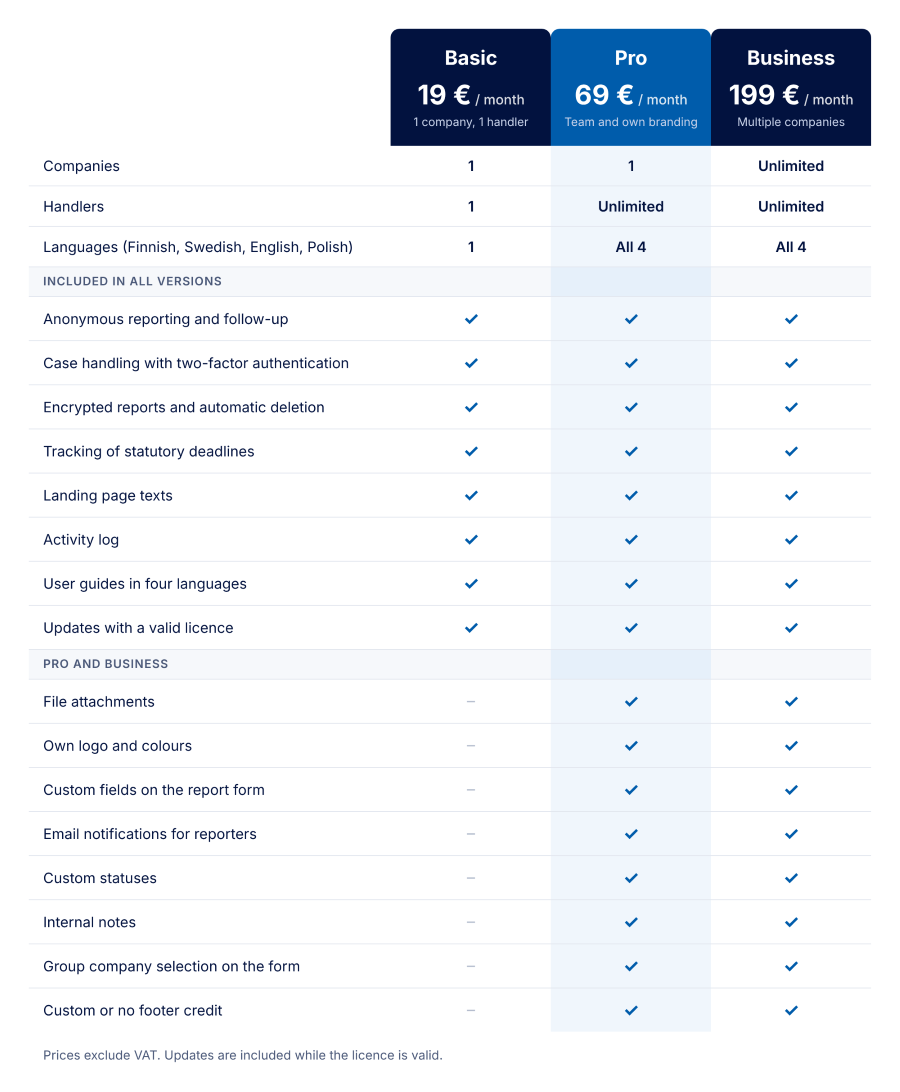
All versions feature the same secure reporting channel. The version determines the number of companies and handlers, as well as the level of customization.
Basic is suitable for a small business where a single person handles the ads. Pro is for a single company with a dedicated team and its own brand identity. Business is for corporate groups and service providers that manage channels for multiple companies within the same installation.
Licensing, Updates, and Requirements
The license is site-specific, and a valid license brings updates to the standard WordPress update screen. Prices are 0% VAT. Open question: billing cycle.
- The channel never goes offline. If the license expires, the notification channel continues to function at its own level. Only updates will stop until the license is renewed.
- Test sites are free of charge. Development and test sites (e.g., localhost, staging.*, dev.*, test.*) do not count toward the license's site limit.
- You can switch versions. When you switch versions, your data is preserved. If you switch to a more limited version, the higher-level settings are saved and will be restored when you upgrade again.
- Requirements: WordPress 6.3 or later and PHP 8.0 or later. The site must use HTTPS and have a working email sending function.

FAQ
Anywhistle meets the technical requirements of the Whistleblower Protection Act and the EU Whistleblower Directive: confidentiality, written reporting, acknowledgment of receipt within 7 days, and feedback within 3 months. The company is responsible for its own handling process and for appointing its data processors.
Cannot be viewed. The administrator manages the settings and handlers, but the content of the notifications is visible only to designated handlers.
The code cannot be retrieved because the channel does not know who the reporter is. The reporter can submit a new report and reference the previous one.
It works. The listing pages are theme-independent, and their design is based on the company's logo and colors.
Oh, in the Business version. Each company has its own address, branding, administrators, and encryption key.